
Chrome Extension
Track every subscription.
Never miss a renewal.
SubPulse is a free Chrome extension that tracks your recurring subscriptions — Netflix, Spotify, ChatGPT and more — so you always know what you're paying and when it renews next.
Features
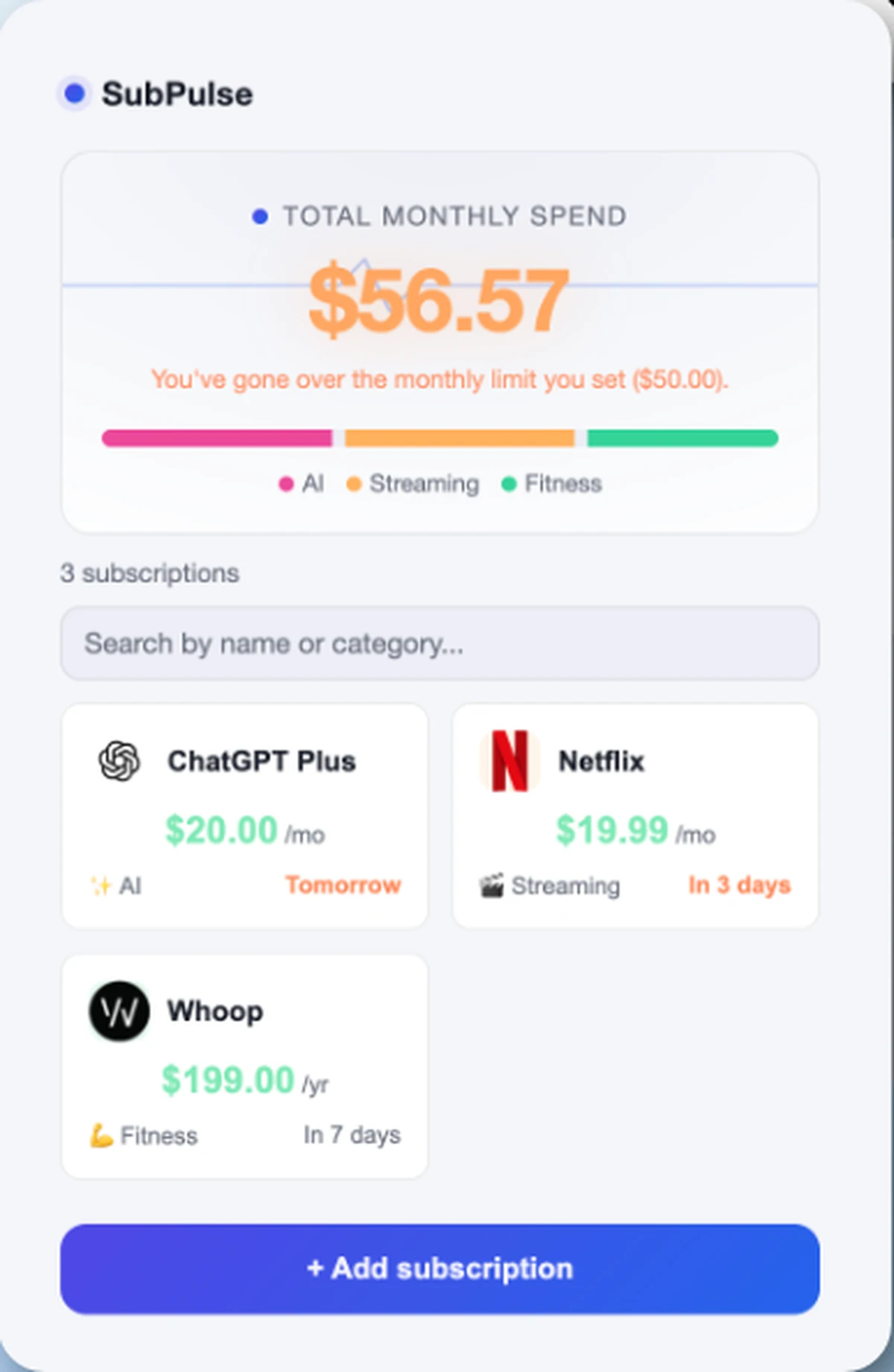
See every renewal
before it hits your card.
Every subscription you forget to cancel is money quietly leaving your account. SubPulse brings Netflix, Spotify, ChatGPT Plus and every other recurring payment into one place, so you decide — not the auto-charge.
Never miss a renewal
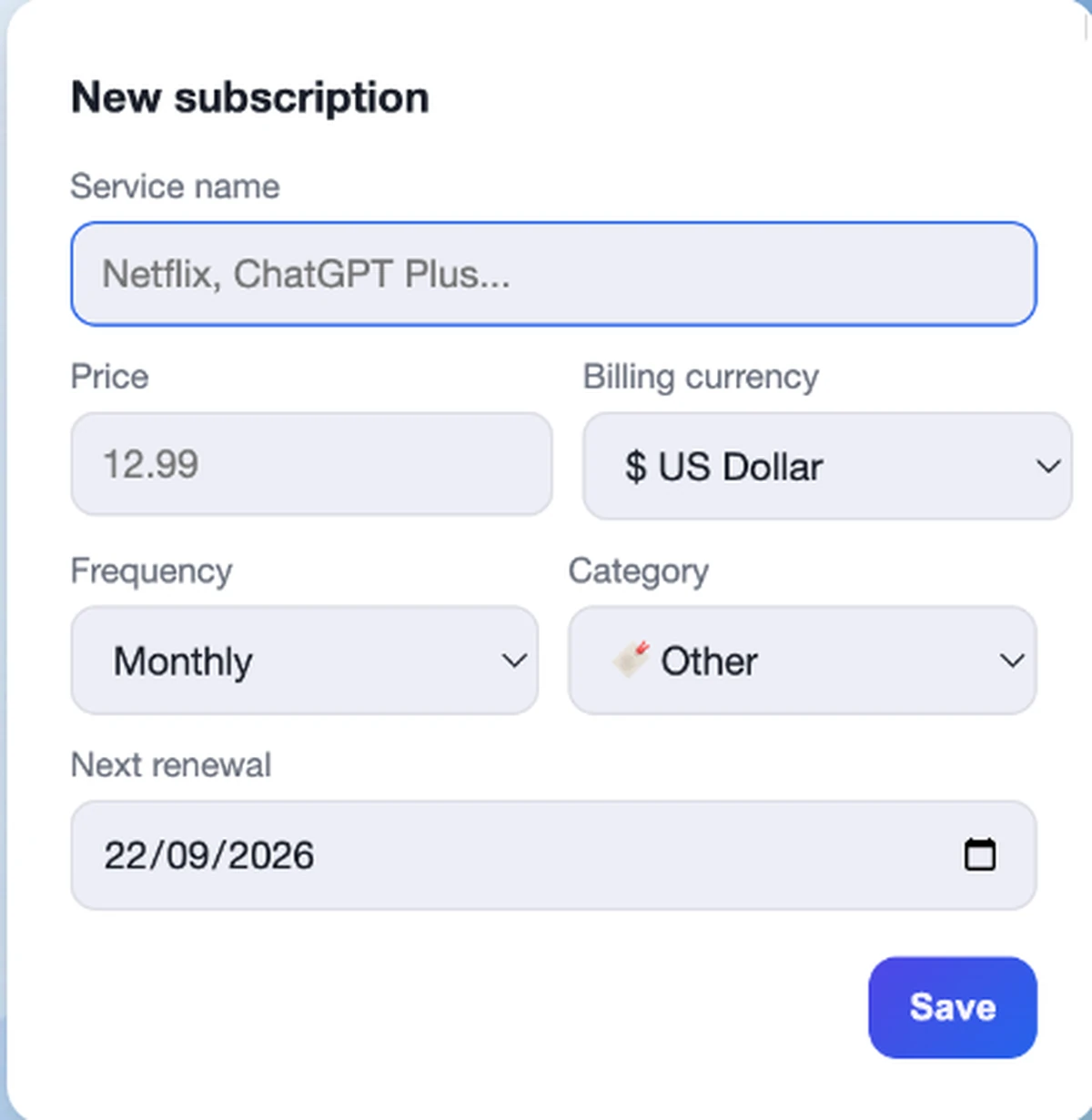
Add any subscription in seconds
Enter the name, price, currency and billing cycle. SubPulse works out the next renewal date and reminds you before it's charged — with an optional calendar (.ics) file and a badge on the Chrome icon.
- Any currency, converted automatically
- Monthly, yearly or a custom cycle
- Reminder before every renewal, plus calendar export
Spending under control
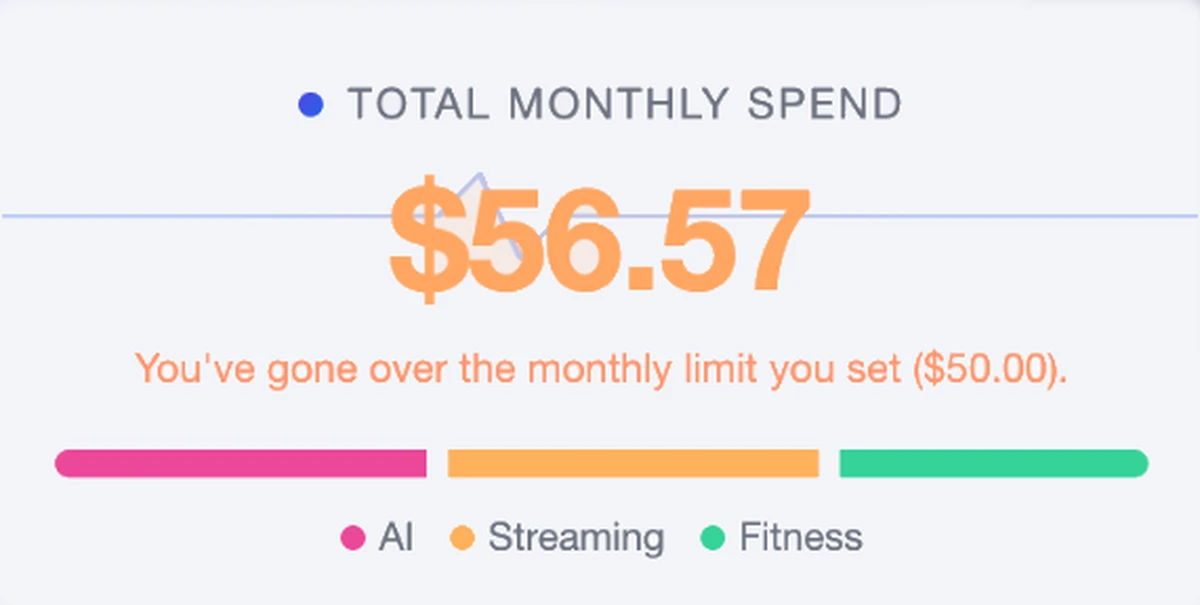
Set a monthly limit and watch it in real time
Decide how much you want to spend on subscriptions each month. The popup shows your total spend and a breakdown by category, so you always know where the money goes.
- Progress bar by category
- Clear warning if you go over budget
- Total updated every time you open the popup
Price history & alerts
SubPulse keeps a history of what you've paid and flags it when a service raises its price.
Multi-currency
Track each subscription in its own currency and see it converted automatically.
Pause, don't cancel
Pause a subscription you're not using and pick it back up later without losing its history.
Search, duplicate, undo
Find any subscription fast, duplicate a similar plan, or undo a deletion before it's gone for good.
Backup & export
Back up your data as JSON, or export everything to CSV whenever you like.
Private by design
No account, no server. Your subscriptions are stored locally in your browser, and SubPulse never sells your data.
How it works
From zero to in control,
in under a minute.
Install the extension
One click from the Chrome Web Store. No sign-up, no card, no friction.
Add your subscriptions
Name, price, category and renewal date. About thirty seconds per service.
Get reminded on time
SubPulse shows a badge on the icon and reminds you before each renewal — with calendar export if you want it there too.
Pricing
Free to get started,
Pro when you want more.
- Up to 5 subscriptions
- Renewal reminders
- Category breakdown
- Unlimited subscriptions
- Spending trend chart
- Monthly comparison
- Upcoming payments
- CSV export
FAQ
Questions, answered.
What is SubPulse?
SubPulse is a free Chrome extension that tracks your recurring subscriptions — streaming, software, fitness, AI tools and more — in one place, so you can see your total spend and upcoming renewals at a glance.
How do I track my subscriptions?
Click the SubPulse icon, add a subscription's name, price, currency, category and billing cycle, and SubPulse calculates the next renewal date and keeps a running total for you.
Does SubPulse work in Chrome?
Yes. SubPulse is built as a Chrome extension and installs directly from the Chrome Web Store in one click.
Does SubPulse require an account?
No. There's no sign-up and no login. You install the extension and start adding subscriptions right away.
Where is my subscription data stored?
Locally, in your own browser. SubPulse has no server of its own for storing your subscription data, and it doesn't sell your data.
Can I track Netflix, Spotify, ChatGPT and other subscriptions?
Yes. SubPulse works with any subscription you add manually — streaming services, software, AI tools, fitness apps, and anything else you pay for on a recurring basis.
Can I track subscriptions in different currencies?
Yes. Each subscription can have its own currency, and SubPulse converts it so your totals stay accurate.
Can SubPulse remind me before a renewal?
Yes. SubPulse reminds you ahead of each renewal, shows a badge on the Chrome icon, and can add the renewal date to your calendar via a .ics file.
Is SubPulse free?
Yes. The free plan includes up to 5 subscriptions, renewal reminders and a category breakdown. SubPulse Pro removes the limit and adds more detail for 2.99 €/month or 19.99 €/year.
What does SubPulse Pro include?
Unlimited subscriptions, a spending trend chart, a monthly comparison, a view of upcoming payments, and CSV export.
Can I export my subscriptions?
Yes. You can export your subscriptions to CSV, or back up and restore all your data as a JSON file.
Does SubPulse connect to my bank account?
No. SubPulse doesn't connect to any bank, card or payment provider — you add your subscriptions manually, and nothing financial is linked or shared.
Is this the same as other apps called SubPulse?
No. This SubPulse is a personal subscription tracker built as a Chrome extension for everyday subscriptions like streaming or software. It isn't affiliated with other tools that share a similar name, including developer-focused dashboards.
SubPulse
Stop paying for what you forgot.
Install SubPulse for free and see your full subscription list in under a minute.